Verb: Interface & modes
The Outboard-Verb window: the mode row, the preset bar, the knob rack and the display underneath — and how Delay, Reverb and Combined relate to each other.
Outboard-Verb puts a stereo delay and a reverb in one plugin. You can run either on its own or both at once, and the knob rack always shows the controls that belong to whatever you are editing.
The header

- Outboard logo (left) — opens product information and the licence view.
- OUTBOARD VERB — the wordmark, centred.
- Bypass disc (right) — master bypass. It is also exposed to your DAW as the host bypass parameter, so the plugin's own button and the one in your DAW's header always agree. The bypass crossfades over about 20 ms rather than cutting, so you can ride it during a take.
The mode row

Directly under the header sit the three things that decide what you hear.
- DELAY — switches the delay section on. When it is the only one lit you are working on a pure delay.
- REVERB — switches the reverb on. The dot beside the label shows which section the knob rack is currently editing.
- Both lit — Combined mode. The delay feeds the reverb, which is how most useful space sounds are actually built: distinct repeats that then bloom into a room.
Switching between modes crossfades over about 25 ms. There is no click and no gap, so you can change your mind in the middle of a take. When the transport stops, both engines fade out over roughly 15 ms and flush, so nothing rings on into silence.
Two further buttons sit on the same row:
- LIQUID — swaps the classic tank for the Liquid engine. See Verb: Liquid engine.
- FREEZE — holds the current tail indefinitely. See Verb: Reverb.
The preset bar
The preset bar sits in the middle of that same row. The name in the centre is the loaded preset; the arrows on either side step through the factory bank in order, and clicking the name opens the browser. Details in Verb: Presets.
The knob rack
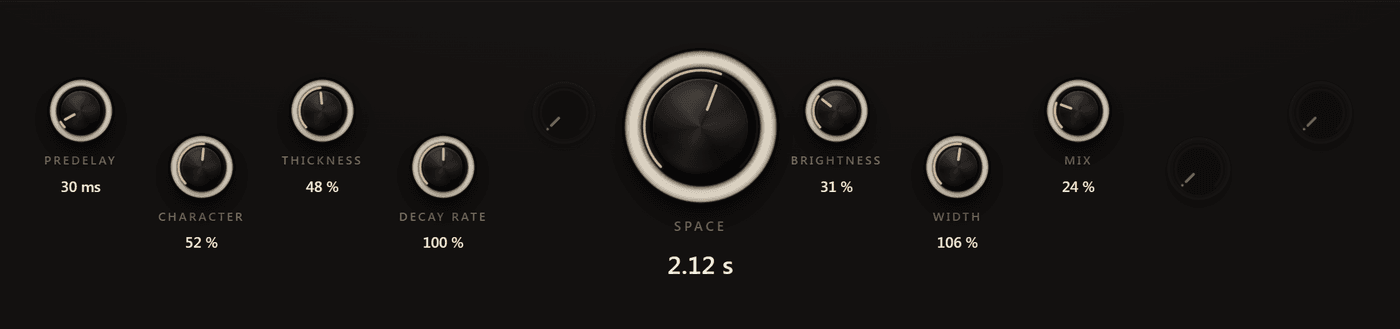
The rack shows the controls for the section you are editing. Knobs that do not apply to the current mode are dimmed rather than hidden, so the layout never jumps around underneath your mouse.
- Drag vertically to change a value.
- Hold Shift while dragging for fine adjustment.
- Double-click a knob to return it to its default.
The large knob in the centre is Space in reverb mode and Time in delay mode — the one control that most defines the sound, kept in the same place in both.
The display
The lower half of the window is the EQ display over a live spectrum. Two tabs switch what the curve edits:
- POST EQ — six bands that shape the wet signal's tone.
- DECAY — six bands that shape how long the tail rings per frequency.
They are different tools with the same layout, and the difference matters — see Verb: The two EQs.
The status line along the bottom tells you what the display is currently showing and how many controls are active in the current mode.
Outboard-60 L
Outboard-60 L is a six-voice analog polysynth grown into a resonant Liquid engine — anti-aliased oscillators, a four-pole resonant filter, one envelope, an LFO…
Verb: Reverb
Space, Predelay, Character, Thickness, Decay Rate, Brightness, Width, Mix and Freeze — what each reverb control does and which ones interact.