Verb: The two EQs
Post EQ shapes the tone of the wet signal; Decay EQ shapes how long the tail rings per frequency. Same layout, completely different job.
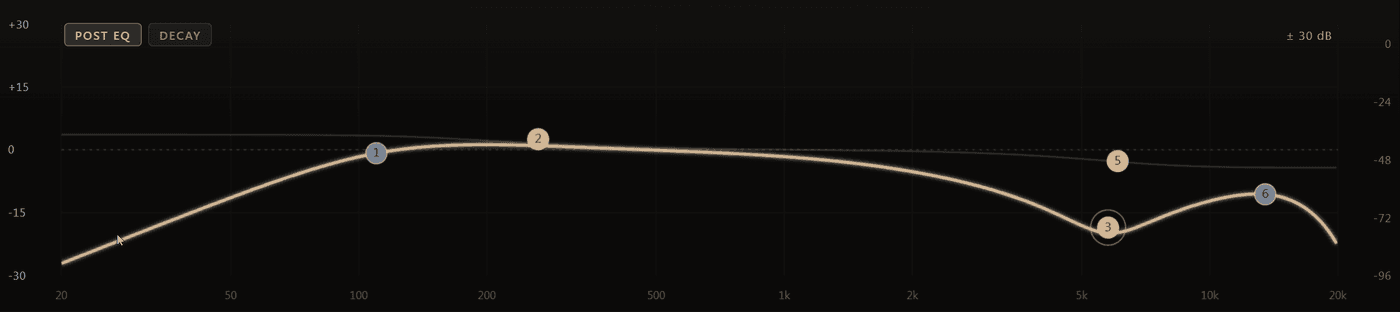
The display underneath the knob rack carries two six-band equalisers behind the POST EQ and DECAY tabs. They look almost identical and do entirely different things. Getting the difference straight is the fastest way to get what you want out of this plugin.
| Post EQ | Decay EQ | |
|---|---|---|
| Changes | how loud each frequency is | how long each frequency rings |
| Unit | decibels | a multiplier on the decay time |
| Affects | the wet signal only | the tail only |
Post EQ
Six bands over the wet path. The dry signal passes through untouched, so you can carve the reverb without dulling the source that feeds it.
Typical uses:
- Low cut around 200–400 Hz — removes the mud a large room adds under a vocal while the vocal itself stays full.
- A dip around 2–4 kHz — keeps the tail from competing with consonants and snare crack.
- A gentle high shelf — adds air to the tail without making the source harsh.
Each band has a type (bell, shelf, cut), a frequency, a gain and a Q. The curve is drawn over a live spectrum of the processed signal, so you are shaping something you can see rather than guessing.
Double-click an empty spot on the curve to add a band, drag it for frequency and gain, use the mouse wheel for Q, and right-click for the band type.
Decay EQ
The same six-band layout, but each band multiplies the decay time in its range instead of its level. This is the control most reverbs do not have.
A band set to 0.3× makes that range die away in under a third of the time. A band at 1.9× makes it ring on almost twice as long. Nothing gets louder or quieter — only shorter or longer.
Why it matters: the usual complaint about a big reverb is not that it is too loud, it is that the cymbals smear and the low end turns to soup. With a level EQ you fix that by removing those frequencies from the tail, which makes the room smaller. With the Decay EQ you simply make them die faster while the room keeps its size.
Two settings worth trying first:
- Highs shorter, lows longer — a big, weighty space that still leaves the top of the mix clear.
- Lows shorter, mids longer — a room that supports a vocal without any build-up underneath it.
The spectrum
The analyser behind both curves shows the signal after processing. When a mix suddenly feels crowded, switch to the reverb and watch where the tail sits — it is usually obvious which range is doing the damage, and whether the fix belongs in the Post EQ (too loud) or the Decay EQ (rings too long).