Verb: Presets & licence
The preset browser, favourites and the default slot — plus activation, the 14-day trial and moving your licence to another computer.
The preset browser
The factory bank holds 540 presets in 20 categories:
- 420 reverb and Liquid presets
- 60 delays
- 60 that run the delay into the reverb
- 120 of them are built on the Liquid engine
Clicking the preset name in the header opens the browser; the arrows either side step through the bank without opening anything.
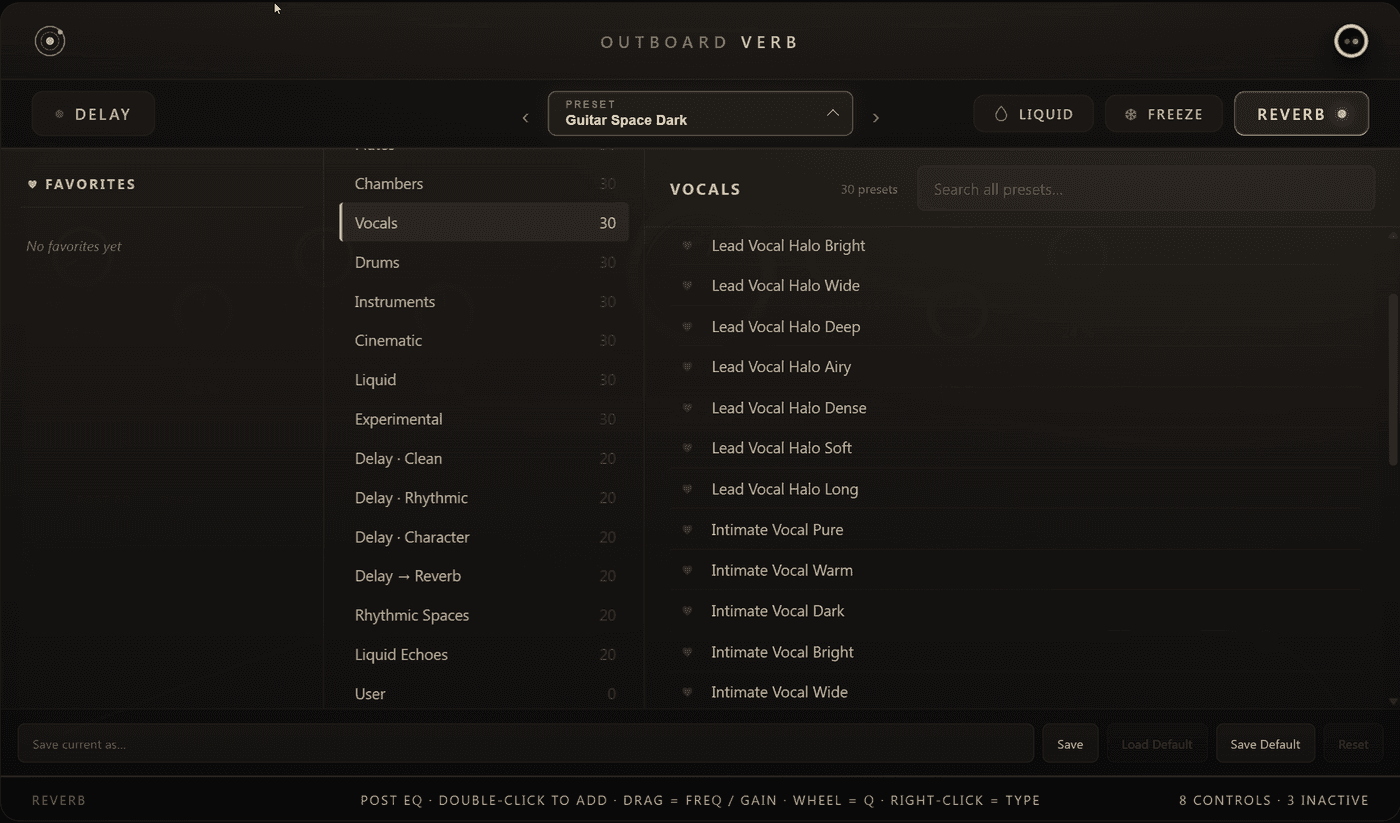
- Categories (left) — the factory bank grouped by the kind of space, plus your own saved presets under User.
- Search (top) — filters across every category at once. Clearing the field returns to the selected category.
- Favourites — click the heart beside any preset to pin it. Favourites get their own list at the top, so the handful you actually use stays one click away.
Saving your own
Type a name into the save field and confirm. Your presets appear under User and can be deleted from the same row.
The default slot
Save as Default stores the current settings as the state every new instance opens with. Load Default recalls it, Reset Default removes it again. A saved DAW session always wins over the default — the default only applies to a freshly inserted plugin.
Activation
Outboard-Verb runs as a full 14-day trial the first time you load it. Nothing is limited during the trial and no purchase is needed to start.
To activate, click the Outboard logo in the header and enter the e-mail you bought with and your licence key. Both are in your purchase confirmation and in your account:
Your account
Licence keys, downloads and invoices.
The activation binds to this computer. It keeps working offline — the plugin carries a long grace period, so a studio machine that never goes online again stays activated.
Moving to another computer
Open the licence view from the logo and choose Deactivate this computer, then activate on the new machine. If the old machine is gone, contact support and we will release the slot for you.
When the trial has run out
An unlicensed plugin past day 14 fades to silence for about one and a half seconds every 40 seconds, so it is unmistakably gated rather than broken. It never gets louder, never adds a tone and never makes noise — entering a valid key restores everything immediately, with your session settings intact.
Installation
Windows ships as a ZIP with the VST3 and CLAP files; macOS as a signed, notarised
.pkg that installs VST3, AU and CLAP. Paths and troubleshooting are in the
INSTALL.txt inside the Windows archive.
Support: hello@outboard.audio
Verb: Liquid engine
The second reverb character — Flow, Shimmer and Tide, and how they change the way a space behaves over time.
PalmML: Interface & Liquid footer
The Outboard PalmML window: header with master strip, preset navigation and Quality selector, the five pages, and the always-visible Liquid footer.